Tuner Overview
Our tuner is a highly accurate chromatic tuner that uses different algorithms depending on the tone frequency of your instrument. This allows for extremely precise tuning.
It supports any chromatic instrument, including guitar, banjo, bass, mandolin, and ukulele. Around 40 stringed instruments are included, each offering a more or less extensive list of predefined tunings. Out of the box, you get access to more than 500 tunings (e.g., Drop D, Rain Song), and you can easily create your own. smartChord supports any tuning with 3 to 9 strings.

Features
- Displays the recognized note, including octave, current frequency, and target frequency (in Hz).
- A color scale shows how close you are to the correct pitch.
- The instrument head shows its pegs. A Peg is highlighted when the detected note and octave match a string in the current tuning. The be faded out via the “Head” button.
- Provides an option for double-string tuning as with a 12-string guitar. Double string tunings have pairs of strings with the same notes, but the octave can be different.
- Vibration feedback is available when the correct note is hit – perfect for hands-free tuning. (Note: this may slightly affect pitch detection.)
- Change the instrument via the menu or by tapping the instrument head.
- Change the tuning via the menu or by tapping the tuning name.
- In the settings category Names, you can switch between the International Pitch Notation (e.g. C4) and the Helmholtz Pitch Notation (e.g. c’)
Note: Changing the instrument also reverts to its last used tuning.
Caution: Over-tightening a string can cause it to break due to excessive tension.
Tuning Modes
The tuner offers a mode for every user and need. It can be changed by the mode button and in the settings:
- Simple Mode – a clean and easy-to-use interface.
- Detailed Mode – shows all information, including pitch accuracy down to a tenth of a Hertz.
- String Change Mode – makes changing strings a breeze, even for beginners.
- Pitch Pipe Mode – helps train your ear by playing the reference tone.
Simple Mode
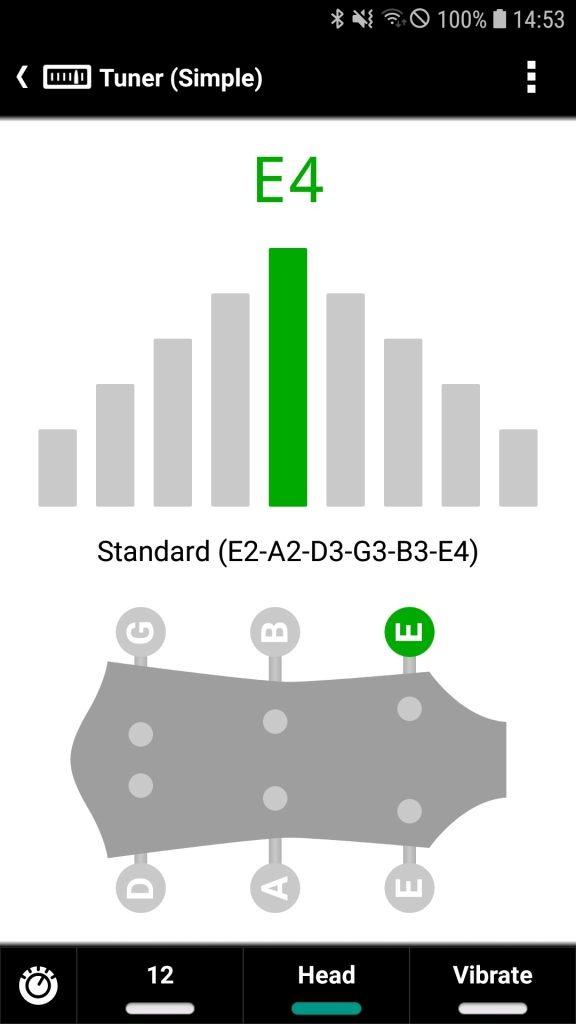
Simple Mode offers a clean and user-friendly interface, making it ideal for beginners. It displays only the most essential information, avoiding unnecessary details so that new users can focus entirely on tuning their strings.
Despite its simplicity, Simple Mode fully supports the tuning of double-stringed instruments.
We recommend enabling the instrument head display, as it highlights the tuning peg corresponding to the string currently being tuned.

Detailed Mode
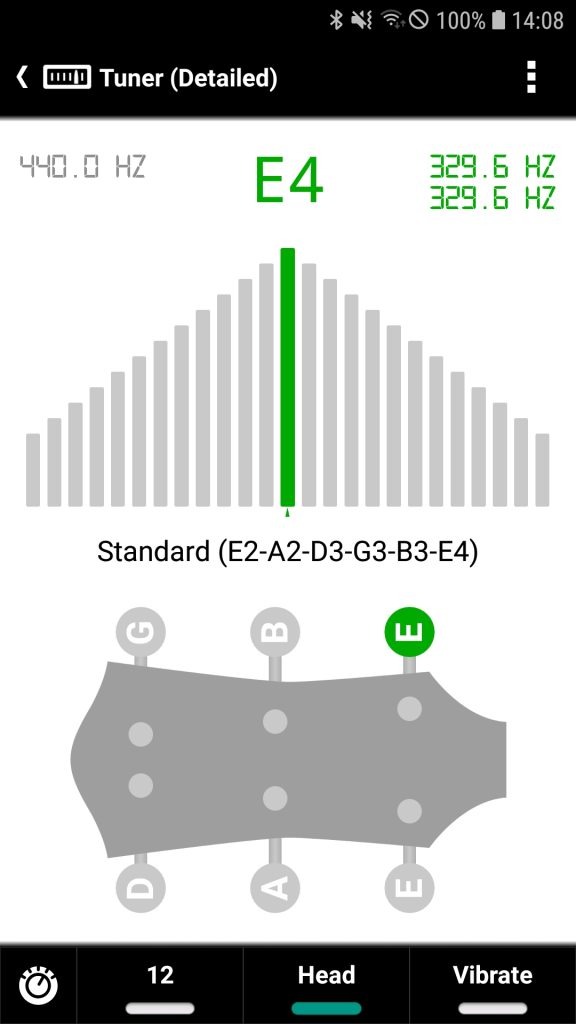
Detailed Mode displays all available information for precise tuning — including the exact frequency of the detected pitch, accurate to one-tenth of a Hertz.
Because the pitch detection is highly sensitive and extremely accurate, this mode is best suited for well-tuned, stable instruments.
Instruments with lower tuning stability — such as many budget models — often experience small, natural fluctuations in pitch. For beginners, this can be confusing, as the values may appear to change constantly during tuning.
For that reason, we recommend Simple Mode for less experienced users or when working with instruments that do not maintain a steady pitch.

String Change Mode
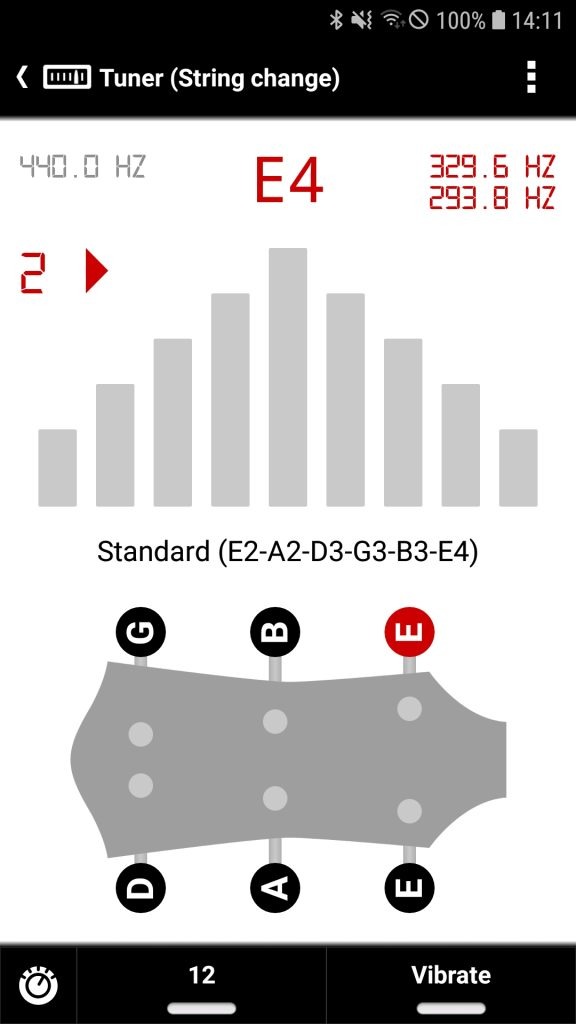
String Change Mode is designed to help beginners accurately tune their instrument after replacing strings.
When fitting new strings, it’s crucial to tune each string not only to the correct note, but also to the correct octave. This mode eliminates any uncertainty: the tuner only confirms a successful result when both the note and the octave match the target.
How it works
- In this mode, strings are tuned one at a time.
- You have to tap the tuning peg of the string you want to tune.
- After plucking the string, the tuner provides clear guidance:
- If the pitch is too low, a number appears on the left, showing how many semitones higher the string must be tuned. A right-pointing arrow indicates the direction to increase the pitch.
- If the pitch is too high, a number appears on the right, showing how many semitones lower the string must be tuned. A left-pointing arrow indicates the direction to lower the pitch.
- This visual feedback helps avoid tuning the string to the wrong note or octave — a common mistake with fresh strings.
Additional Information
The tuner also displays:
- The target frequency for the selected string
- The currently detected frequency being played
This allows you to see how far the current pitch is from the intended target, based not just on note names but also on exact frequency values.

Pitch Pipe Mode
The tuner in the Pitch Pipe mode plays the tones of the selected tuning and helps train your musical ear.
This mode is ideal for users who prefer to tune by ear rather than relying on visual indicators. It’s also a great way to develop pitch recognition skills over time.
How it works
- Tap on a peg of the instrument head to play its reference tone.
- Match the pitch of your instrument’s string to the sound you hear.
- The tone is replayed automatically. Tap again to stop it.
Additional Notes
- This mode is especially useful in loud environments where microphone-based pitch detection may struggle.
- It can also be used as a training tool to improve your tuning accuracy and develop a better sense of pitch.

Settings & Customization
In the settings, you’ll find useful options such as:
- Microphone input visualization – see the exact frequency detected by your device.
- Reference pitch adjustment – set the reference frequency for A4 anywhere between 400 Hz and 480 Hz.

Microphone Gain Adjustment
The Tuner’s sensitivity can vary significantly depending on your device’s hardware and your environment. You can activate the Microphone Gain slider within the settings to fine-tune how the app “hears” your instrument.
When to decrease gain (Sensitivity < 1.0):
- Background Noise: If you are in a loud environment and the tuner reacts to ambient noise.
- Too “Jumpy”: If the tuner needle flickers rapidly or detects high-frequency overtones instead of the fundamental note.
- Electric Guitars: If you are using an amplifier and the signal is “clipping” (distorting) the input.
When to increase gain (Sensitivity > 1.0):
- Weak Signal: If your instrument is very quiet (e.g., an unplugged electric guitar) and the tuner has trouble picking up the sound
- Distant Mic: If your phone is placed far away from the instrument
