s.mart Tutorial Series
Welcome to our tutorial series: Exploring Music Theory and Practice!
Hello there! If you’re ready to take a deeper dive into your musical journey, this tutorial series is here to help. We aim to provide a practical, step-by-step guide to understanding the fundamentals of music theory, all while using the excellent and comprehensive tools available in your smartChord app.

What we hope to achieve together
This series is structured to help build your knowledge and practical playing skills, regardless of where you are starting from. Our goal is to connect the dots between playing chords and developing a solid understanding of the music you enjoy and create.
- Learning with the App: We will utilize smartChord’s features—like the Ear Trainer, Fretboard Trainer, and Scales—to explore musical concepts in a clear, visual, and engaging way.
- A Structured Path: The tutorials feature progressive, sequential exercises. Each lesson is designed to gently build upon the last, helping you develop a confident and expanding skill set. You’ll find clear practice instructions that correspond directly to specific smartChord functions.
- Gradual Improvement: We’ll work through a series of focused drills and assignments intended to gradually sharpen your technique, improve your listening skills, and expand your theoretical understanding.
Available tutorials: Build your ear and master the fretboard
The s.mart Tutorial Series currently offers two fully interactive tutorials that run directly inside smartChord. Both follow the same guided, step-by-step concept and are the ideal entry point into structured practice.
Ear Training Tutorial
The first module focuses on developing your foundational auditory abilities with the smartChord Ear Trainer. It contains 52 dedicated exercises focused on learning to confidently identify all musical intervals. A strong ear is the basis for improvisation, transcription and composition – and once you finish this module, you will feel much more comfortable and accurate in identifying any interval you hear – a crucial step toward greater musical confidence.
👉 Ear Training Tutorial – Overview
Fretboard Training Tutorial
The second module puts the smartChord Fretboard Trainer to work. In a series of progressive exercises you learn to navigate the entire neck with confidence – identifying notes, intervals, scale shapes and chord positions anywhere on the fretboard. Knowing the fretboard inside out is what turns memorized shapes into free, musical playing: faster song learning, more confident improvisation and a much clearer understanding of what you are actually doing on the instrument.
👉 Fretboard Training Tutorial – Overview
A look ahead: Topics we may cover
Building on the listening and fretboard foundations, several further areas are planned for upcoming tutorials:
- Scale Patterns: Understanding patterns relevant to soloing and improvisation.
- Fretboard Finger Exercises: Drills addressing finger strength, speed and precision.
- Rhythm Training: Using smartChord’s Metronome and Drum Machine features to help solidify your timing and rhythmic feel.
There will be much more… and we look forward to continuing this musical exploration with you!
How it works
If a tutorial is available for a tool, a menu entry for the tutorial will appear in the “Folder” menu.

The tutorial opens in full-screen mode. At the beginning of each tutorial, you’ll find the language selection represented by country flags, followed by the Library.
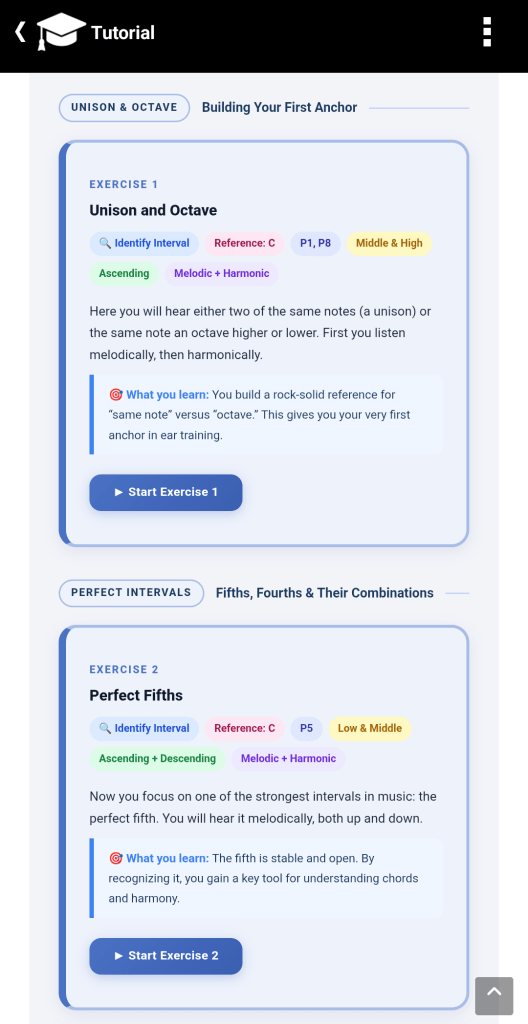
The chapters are clickable, allowing you to jump directly to a specific section – for example, to the settings. Otherwise, the tutorial is self-explanatory and can be explored by scrolling vertically.
When you open the tutorial next time, it will resume at the position you last viewed.

A tutorial may offer settings that allow you to influence how exercises are created.
In the case of Ear Training, clicking on an exercise will generate a quiz in the Ear Trainer.
In the settings section, you can adjust the answer view — that is, how you want to answer the quiz: whether using a Fretboard, Piano, or List view.

Switching between the tutorial and the corresponding smartChord tool is done directly from within the tutorial using clickable links.
For example, in the Ear Trainer Tutorial, you can click the link “Exercise 1”. When you do, the Ear Trainer opens and automatically creates the corresponding exercise.
This exercise receives a unique name associated with the tutorial.
Save the exercise in the Ear Trainer and practice it according to the instructions.
When you tap Back in the Ear Trainer, you’ll return to the tutorial and can continue from where you left off.
Important:
If you click a link in the tutorial that refers to an exercise you’ve already created and saved under the suggested name, that exercise will simply reopen — allowing you to continue your practice.
Just like any other exercise created in the Ear Trainer, exercises generated from within a tutorial are also listed in the Ear Trainer’s Library.
This means you can open and practice them directly in the Ear Trainer, without having to return to the tutorial.
Tip:
To make navigation easier, you’ll find a button at the bottom right of each tutorial page that takes you back to the Library, where you can quickly jump to any other chapter.
