Logbook
With the Logbook in smartChord, you’ve got a powerful little helper at your side—one that keeps track of your musical journey and gives you a clearer picture of how you’re growing. Whether you’re practicing regularly, working on a new song, preparing for a gig, or jotting down creative sparks: the Logbook ties it all together in one easy place.
Think of it as your musical diary. It shows you what you’ve already achieved, helps you stay organized, and gives you the motivation to keep going—because nothing feels better than seeing real progress.
Why should you use the Logbook
Musical progress can be slow and sometimes hard to notice. With the Logbook, your development becomes visible: you see what you practiced, how often, and what worked well. Over time, you’ll discover patterns that help you adjust your routine and make your practice sessions more effective.
What you can expect
- A clear overview of your practice sessions
- Space for your thoughts, emotions, and ideas
- Better planning and more structure in your musical routine
- A personal archive of rehearsals, performances, and progress
The Logbook helps you shift from just “going through the motions” to practicing with intention. By reflecting on what you did and how it felt, you become a more conscious and efficient musician. And that ultimately leads to faster, more rewarding progress.
The smartChord Logbook
The Logbook in smartChord helps you keep track of your musical journey without any extra effort. Once activated, it quietly works in the background and records your sessions—so you can focus completely on playing, practicing, creating, and having fun. The Logbook keeps your musical life organized, synced, and visible—without getting in the way of your creativity. It’s your silent partner in becoming a more mindful, intentional musician. Welcome to a smarter way of practicing with smartChord!
How to reach the Logbook
The Logbook can be placed onto the home screen and started from there.
Once the Logbook is enabled for a smartChord tool, you can reach it directly from the navigation menu of the tool.
If an entry refers to a smartChord tool, you can jump straight to that tool from the entry – super handy when reviewing past sessions.
How it works
As a first step, open the Logbook from the home screen or its navigation menu. When you start it for the first time, you can choose which tools you want to keep a logbook for. You can change this selection at any time in the Logbook settings.
In the settings, you can also decide whether you want to edit or add to new entries before saving them. There you also have the option to discard a new entry.


Once a tool is activated, smartChord automatically creates a new Logbook entry every time you open that tool. When you return to the home screen or switch to another tool, the entry is saved.
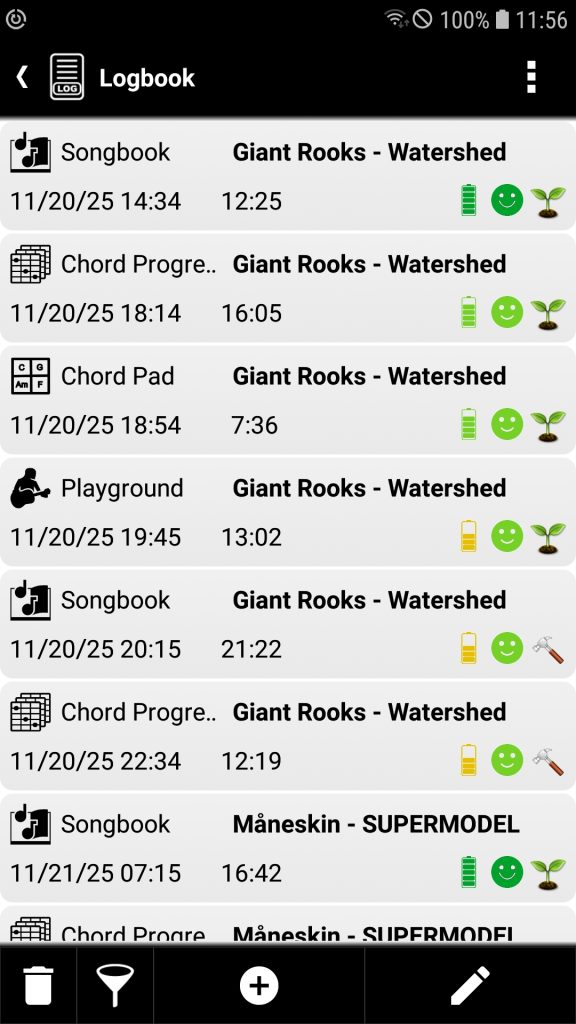

What a Logbook entry contains
Each entry captures everything you need to remember a session:
- Date – when you started
- Duration – how long you practiced
- Tool used – the smartChord feature you worked with
- Exercise name – automatically assigned or written by you
- Optional extras to keep things personal:
- Notes
- Status
- Your energy level
- Your mood
Manage your entries

Your Logbook lists your entries in the order in which they were created. With a double-click or the Edit button, you can modify any entry afterwards. You can also delete entries.
You can also filter your Logbook entries by tools, names, or a specific time range to quickly find exactly what you’re looking for. This makes it easy to review your practice habits, track progress, or revisit past sessions with just a few taps.
The Logbook isn’t limited to smartChord tools. Use the Add button to create your own entries anytime. Add anything you like “Gig”, “Band rehearsal”, “Idea”, “Songwriting”, “Recording session”, whatever fits your musical world. The tool name is completely up to you.
For automatically generated entries, you cannot change the tool or the creation date. For manually created entries, you can modify everything afterwards.
Statistics & Charts
Because seeing progress is motivating, the Logbook gives you solid insights into your practice habits. You’ll find:
- Overview charts
- Detailed statistics
- Filters for:
- Tool
- Exercise
- Time period (day, week, month, year, total)
Whether you want a quick glance or a deep dive, you’ll always know exactly how much you’re practicing and what you’re focusing on.
Just activate the Statistics button and select one of the statistics in the spinner.
- Summary for the filtered entries
- Stacked chart to get the practice time per tool in minutes
- Stacked chart to get the practice time per exercise in minutes


Sync across all your devices
Your Logbook is part of smartChord’s synchronization. That means all your sessions, notes, and stats stay up to date – no matter which device you’re using.