Share
1 Overview
smartChord has distinctive support for sharing your musical content with friends, bandmates, and students. Whatever you create or collect — songs, set lists, drum patterns, exercises, fretboard quizzes — you can pass it on in a quick, consistent and safe way.
For the complete reference, see the Share documentation on smartChord.de.
2 What You Can Share
Sharing works the same way across smartChord’s whole toolbox, so you only have to learn it once. Among the content types that can be shared:
- Songs — lyrics, chords, notes, and song metadata
- Set lists — whole performances with all their songs
- Chord progressions — for practice or composition
- Drum patterns — from the drum machine
- Exercises — from the practice tool
- Fretboard quizzes — from the Fretboard Trainer
- Lyrics — from the Lyrics Pad
- Notes — quick notepad entries
Because all tools are tightly integrated, you can switch between them without losing your share workflow. See the Share songs page for song-specific options.

The smartChord toolbox — almost every tool can share its content
3 The Standard Share Workflow
The standard way to share an item works the same in every tool. Open the item you want to share, then walk through the four steps below.
3.1 Open the Item and Use the “Folder” Menu
- Open the song, quiz, exercise, or pattern that you want to share
- Tap the folder icon in the toolbar to open the folder menu
- Choose Share from the menu

Open the item you want to share — here a song

The folder menu — tap “Share” to start the workflow
3.2 Pick an App to Share With
smartChord shows the standard Android share sheet so you can use any app that is installed on your device — mail clients, messengers, cloud apps, even “Copy to clipboard”.

Pick the app you want to use for sharing
3.3 Edit the Prepared Message
smartChord prepares the message for you with a link to the shared item and a short hint that the recipient needs the smartChord app to open it. You can edit text, subject, and recipients before sending.

A ready-made message with the share link — edit as you like
3.4 Send
Add your friends, bandmates or students as recipients and send the message. That’s it — the link travels with the message and opens directly in smartChord on the other side.
4 The Recipient Experience
The other side of the workflow is just as simple. Here is what your recipient sees and does.
4.1 Receive the Message
Your recipient gets a regular mail or chat message with a link to the shared content. smartChord must be installed on their device, otherwise the link cannot open. The prepared message includes a Google Play link to make installation easy.

Recipient view — a normal message with a link
4.2 Open the Shared Content
After tapping the link, smartChord opens its Share screen. It lists the shared content without saving it yet, so the recipient can preview it first. If a batch was shared via the Library, the recipient sees the whole list and can pick what to keep.

The “Share” screen — preview before importing
4.3 Import to Keep It Offline
Tapping Import opens the dedicated import screen. The recipient can select which entries to actually save, and the imported items become available offline in the regular Library.

The import screen — pick what should be saved
5 Sync via the Cloud
Beside the message-based share, smartChord can synchronize your songs and set lists with the cloud. Pair this with cloud-side folder sharing and your bandmates always have your latest content.
5.1 Pick Your Cloud
smartChord supports Google Drive, Dropbox, and NextCloud. Choose what fits your setup — Dropbox is the easiest to share folders with, NextCloud the most private, Google Drive the most ubiquitous.

Pick your cloud provider
See the Cloud overview and Synchronize songs and set lists for details.
5.2 Configure Synchronization Options
Folder permissions and synchronization options give you full control over what gets overwritten, created or deleted — and a backup option to prevent any data loss.

Synchronization options give you full control
5.3 Compare and Synchronize
Before files are written, smartChord shows you exactly which items will be updated on each side, with timestamps so you can verify the direction of every change.

Review every change before syncing
6 Export a Whole Set List
Set lists offer additional sharing formats so you can reach an audience that doesn’t use smartChord at all.
- Internal (.scstl) — a zip with all songs, images, and PDFs; perfect for re-importing in another smartChord installation
- HTML — opens in any browser; print or save as PDF from there
- Text — plain text for the audience, the agency, or the clipboard
Customize the export with Library, metadata, page breaks, numbering, and color schemes. See Export, import, print and share for the full set of options.

Set list export — pick format and content
7 Share a Printout as PDF
A lot of features come with a Print menu — chord diagrams, scales, songs, exercises, and more. The print dialog always offers Share PDF, so you can hand over a printable file even when the recipient doesn’t use smartChord.

Print dialog — “Share PDF” turns any printout into a shareable file
Our video shows you the sharing process in detail.

In short
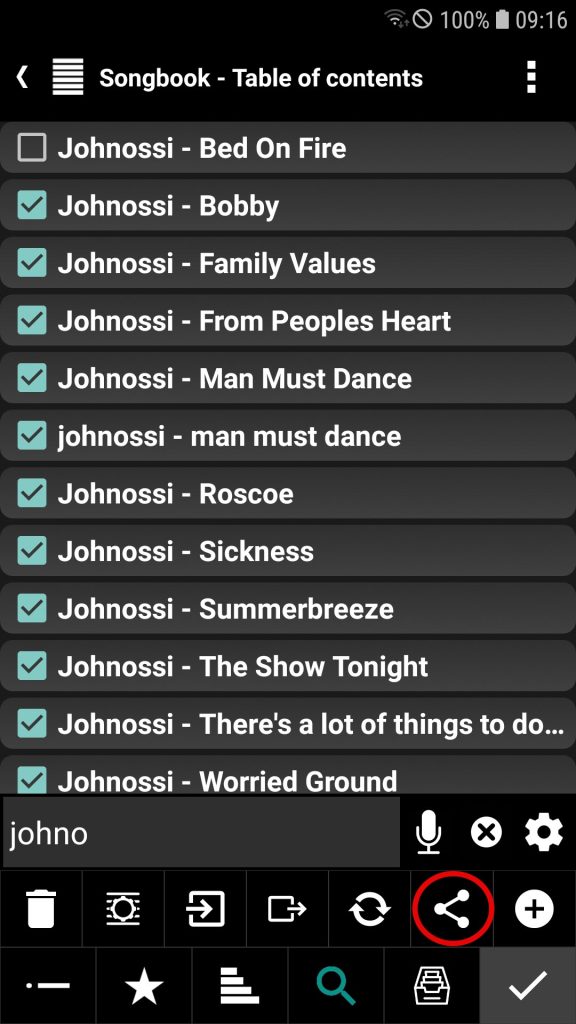
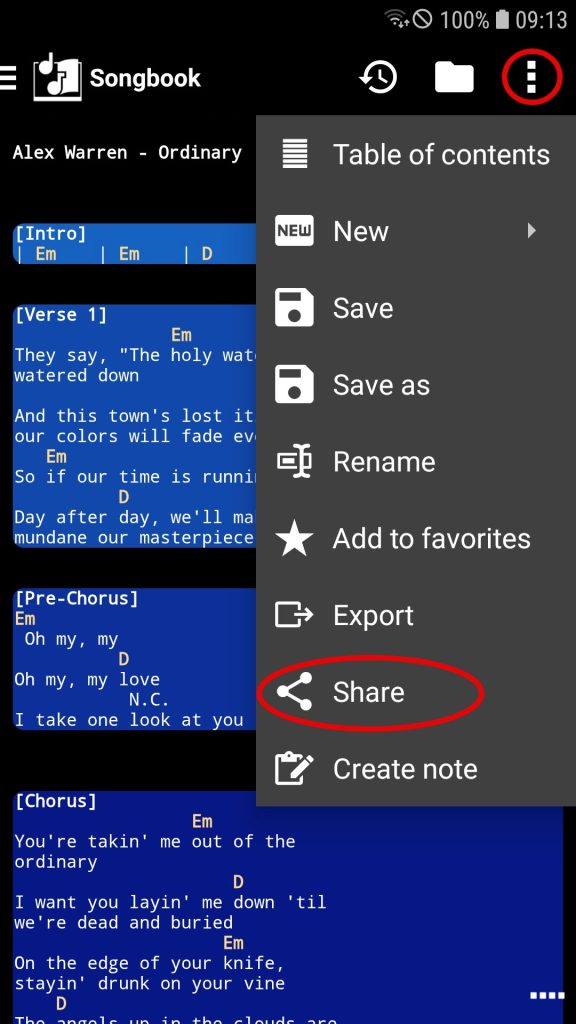
In the Library, entries such as songs can be shared using the Share button. If multi-selection is enabled, you can also share multiple entries at once. Within the tools themselves, the currently active entry can be shared via ⁝ → Share.
If someone wants to share something with you, simply click the link in the received message and follow the instructions to view or import the content.
Troubleshoot
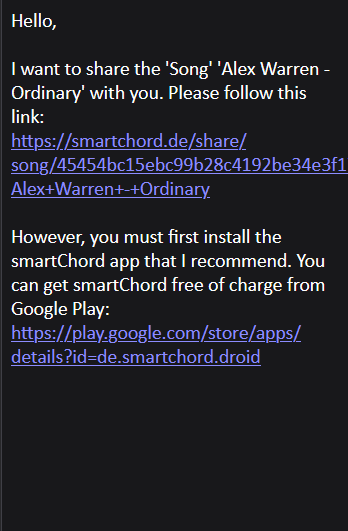
If you receive a message via email or messenger from a friend who wants to share content with you, it looks like this:

If you follow the link in the message and see this page, something went wrong!
There is a workaround to access the shared content:
- Copy the link from the message.
- Go to the smartChord home screen.
- Open the navigation menu in the top-left corner and select “Get shared content”
- Paste the link into the dialog that appears and confirm.
- The tool will then open and display the shared content.


